
Please use the Search Box above to search for keywords related to your issue. Using one or two keywords works best.
For quick answers to general usability questions, we recommend your visit our friendly Trainz forums,
To submit a Support Ticket, click on the Troubleshooter Button, then follow the steps through to the appropriate Category. Login using your Simulator Central or MyTrainz Username and Password.
For quick answers to general usability questions, we recommend your visit our friendly Trainz forums,
To submit a Support Ticket, click on the Troubleshooter Button, then follow the steps through to the appropriate Category. Login using your Simulator Central or MyTrainz Username and Password.
NEW HELPDESK REQUIREMENTS
To ensure we can provide quality, timely responses to as many customers as possible, we have made some changes to the helpdesk support service.
Thanks for your understanding.
To ensure we can provide quality, timely responses to as many customers as possible, we have made some changes to the helpdesk support service.
- We will only support tickets submitted in English. Please use an online translation tool to translate your messages.
- We will assist users with problems related to orders, downloading, installation or access only.
- Any questions about general product usage will be referred to our community forums, Trainz wiki and Knowledgebase articles.
Thanks for your understanding.
Knowledgebase: Downloading, Installing and Patching
|
Cannot click Next to accept the Agreement when installing
Posted by N3V Games (Paul) on 23 July 2015 10:38 AM
|
|
|
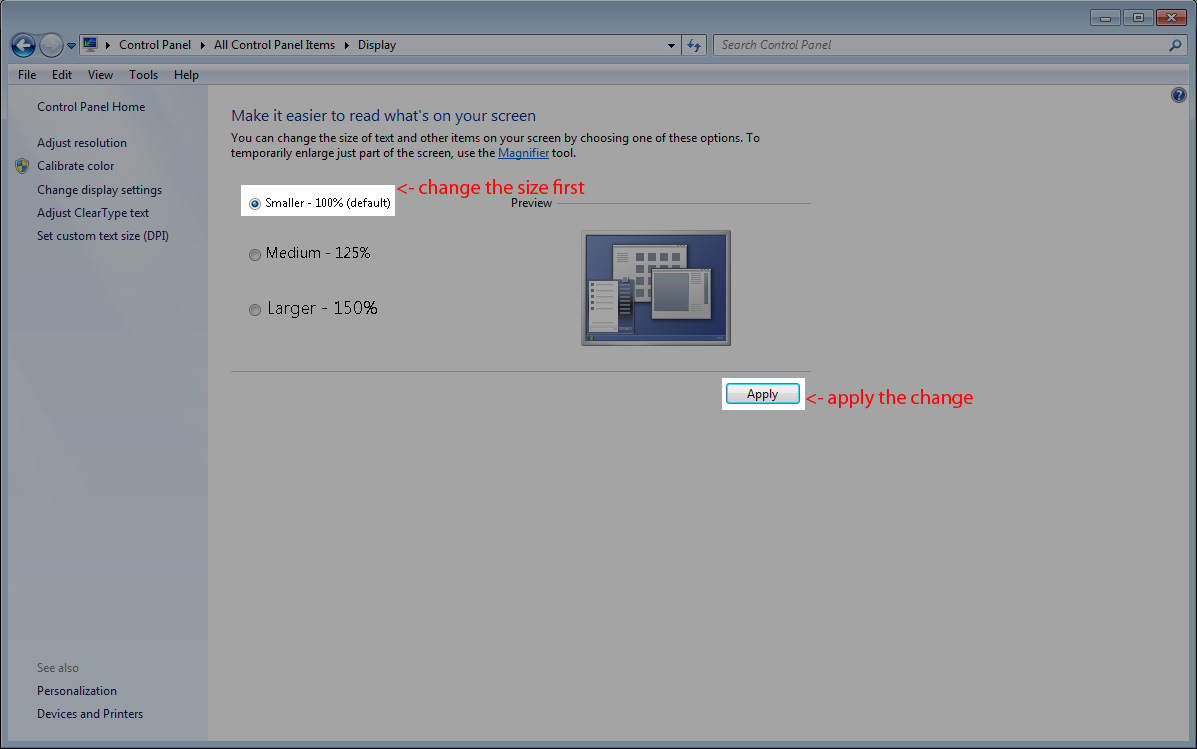
If the Next key is not visible, you can hit Enter to accept the Agreement (you may have two Agreements depending on your installation). You can also reset your windows font size to correct this issue. You can do this using the following steps. 1. Right click on your desktop, and click on "screen resolution". 2. In the screen resolution window, click on the "make text and other items larger or smaller" link. 3. Select the option for "smaller 100% (default)", and then click on apply.
4. You will be asked to log out, click on the "log off now" button, then log back into windows. You must log off for this change to take effect. 5. Now try running the Trainz: A New Era installer. | |
 (22 vote(s)) (22 vote(s)) Helpful Helpful Not helpful Not helpful |
Comments (0)