NEW HELPDESK

We are migrating over to a new helpdesk system. New tickets have been turned off for this one. You may still reply to your open tickets.

The new helpdesk is available at https://support.trainzsimulator.com
NEW HELPDESK REQUIREMENTS

To ensure we can provide quality, timely responses to as many customers as possible, we have made some changes to the helpdesk support service.

  1. We will only support tickets submitted in English. Please use an online translation tool to translate your messages.
  2. We will assist users with problems related to orders, downloading, installation or access only.
  3. Any questions about general product usage will be referred to our community forums, Trainz wiki and Knowledgebase articles.
If your ticket does not meet these requirements, you will receive a standard response informing you of the new requirements.

Thanks for your understanding.
Knowledgebase: Trainz Plus
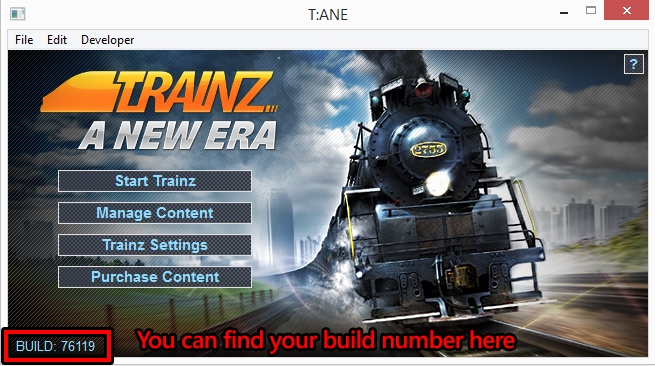
How do I find out my Build Number?
Posted by N3V Games (Paul) on 03 August 2015 04:56 PM

The build number is shown in the T:ANE Launcher which opens when you first start Trainz A New Era. The same applies to TRS19 and TRS22/TrainzPlus.


Tags: TANE, Update, Patch, Download, Service, Pack,

(13 vote(s))
Helpful
Not helpful